VUE+Canvas 實現桌面彈球消磚塊小游戲的示例代碼
大家都玩過彈球消磚塊游戲,左右鍵控制最底端的一個小木板平移,接住掉落的小球,將球彈起后消除畫面上方的一堆磚塊。
那么用VUE+Canvas如何來實現呢?實現思路很簡單,首先來拆分一下要畫在畫布上的內容:
(1)用鍵盤左右按鍵控制平移的木板;
(2)在畫布內四處彈跳的小球;
(3)固定在畫面上方,并且被球碰撞后就消失的一堆磚塊。
將上述三種對象,用requestAnimationFrame()函數平移運動起來,再結合各種碰撞檢查,就可以得到最終的結果。
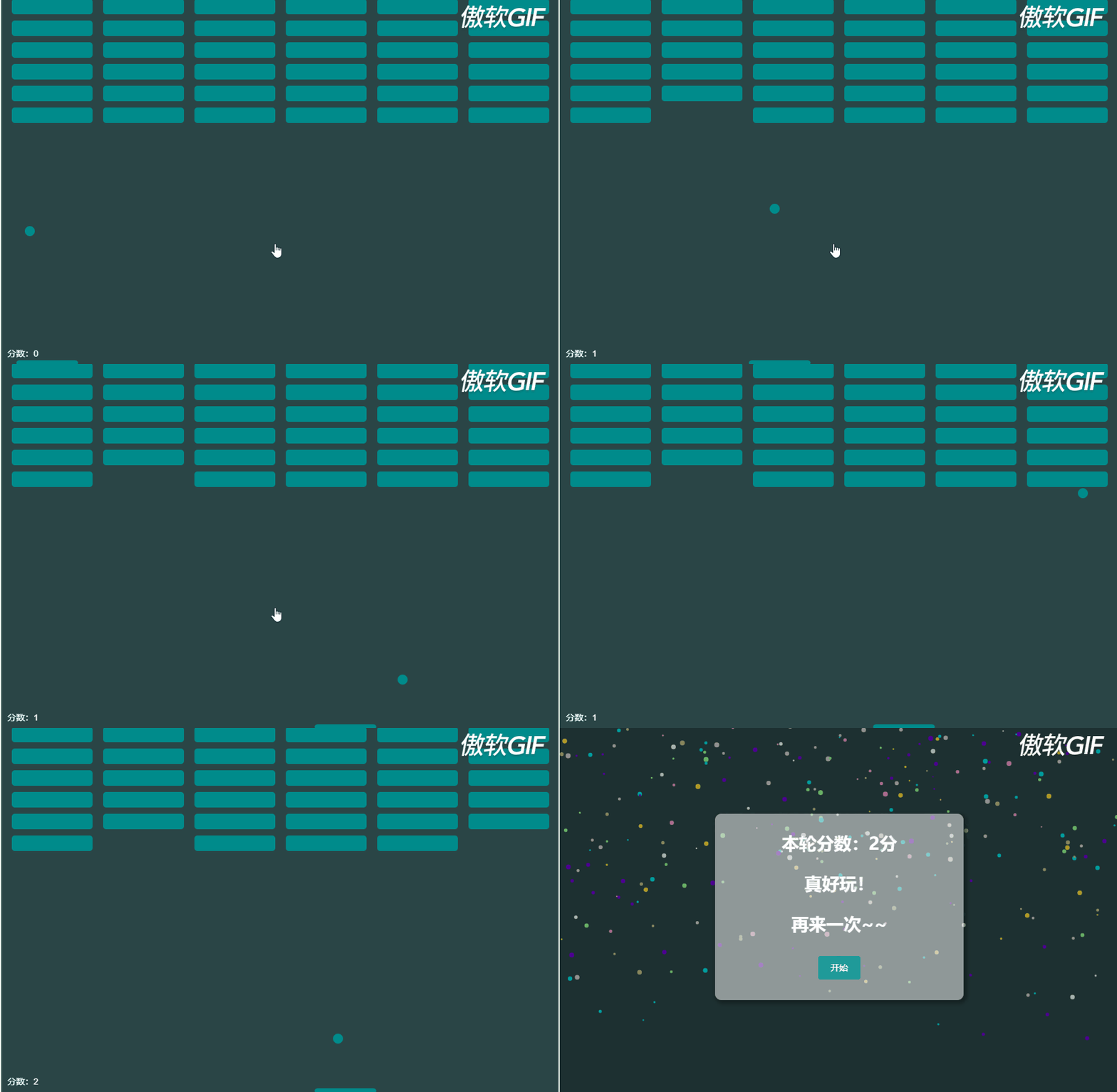
先看看最終的效果:
最底部的木板是最簡單的一部分,因為木板的y坐標是固定的,我們設置木板的初始參數,包括其寬度,高度,平移速度等,然后實現畫木板的函數:
pannel: {x: 0,y: 0,height: 8,width: 100,speed: 8,dx: 0}, .... drawPannel() { this.drawRoundRect(this.pannel.x,this.pannel.y,this.pannel.width,this.pannel.height,5 );},drawRoundRect(x, y, width, height, radius) { // 畫圓角矩形 this.ctx.beginPath(); this.ctx.arc(x + radius, y + radius, radius, Math.PI, (Math.PI * 3) / 2); this.ctx.lineTo(width - radius + x, y); this.ctx.arc(width - radius + x,radius + y,radius,(Math.PI * 3) / 2,Math.PI * 2 ); this.ctx.lineTo(width + x, height + y - radius); this.ctx.arc(width - radius + x,height - radius + y,radius,0,(Math.PI * 1) / 2 ); this.ctx.lineTo(radius + x, height + y); this.ctx.arc(radius + x,height - radius + y,radius,(Math.PI * 1) / 2,Math.PI ); this.ctx.fillStyle = '#008b8b'; this.ctx.fill(); this.ctx.closePath();}
程序初始化的時候,監聽鍵盤的左右方向鍵,來移動木板,通過長度判斷是否移動到了左右邊界使其不能繼續移出畫面:
document.onkeydown = function(e) { let key = window.event.keyCode; if (key === 37) {// 左鍵_this.pannel.dx = -_this.pannel.speed; } else if (key === 39) {// 右鍵_this.pannel.dx = _this.pannel.speed; }};document.onkeyup = function(e) { _this.pannel.dx = 0;};.... movePannel() { this.pannel.x += this.pannel.dx; if (this.pannel.x > this.clientWidth - this.pannel.width) {this.pannel.x = this.clientWidth - this.pannel.width; } else if (this.pannel.x < 0) {this.pannel.x = 0; }},二、彈跳的小球和碰撞檢測
小球的運動和木板類似,只是不僅有dx的偏移,還有dy的偏移。
而且還要有碰撞檢測:
(1)當碰撞的是上、右、左墻壁以及木板上的時候則反彈;
(2)當碰撞到是木板以外的下邊界的時候,則輸掉游戲;
(3)當碰撞的是磚塊的時候,被碰的磚塊消失,分數+1,小球反彈。
于是和木板一樣,將小球部分分為畫小球函數drawBall()和小球運動函數moveBall():
drawBall() { this.ctx.beginPath(); this.ctx.arc(this.ball.x, this.ball.y, this.ball.r, 0, 2 * Math.PI); this.ctx.fillStyle = '#008b8b'; this.ctx.fill(); this.ctx.closePath();},moveBall() { this.ball.x += this.ball.dx; this.ball.y += this.ball.dy; this.breaksHandle(); this.edgeHandle();},breaksHandle() { // 觸碰磚塊檢測 this.breaks.forEach(item => {if (item.show) { if ( this.ball.x + this.ball.r > item.x && this.ball.x - this.ball.r < item.x + this.breaksConfig.width && this.ball.y + this.ball.r > item.y && this.ball.y - this.ball.r < item.y + this.breaksConfig.height ) { item.show = false; this.ball.dy *= -1; this.score ++ ; if(this.showBreaksCount === 0){ this.gameOver = true; } }} });},edgeHandle() { // 邊緣檢測 // 碰到頂部反彈 if (this.ball.y - this.ball.r < 0) {this.ball.dy = -this.ball.dy; } if (// 碰到左右墻壁this.ball.x - this.ball.r < 0 ||this.ball.x + this.ball.r > this.clientWidth ) {this.ball.dx = -this.ball.dx; } if (this.ball.x >= this.pannel.x &&this.ball.x <= this.pannel.x + this.pannel.width &&this.ball.y + this.ball.r >= this.clientHeight - this.pannel.height ) {// 球的x在板子范圍內并觸碰到了板子this.ball.dy *= -1; } else if ((this.ball.x < this.pannel.x || this.ball.x > this.pannel.x + this.pannel.width) &&this.ball.y + this.ball.r >= this.clientHeight ) {// 球碰到了底邊緣了this.gameOver = true;this.getCurshBreaks(); }}三、磚塊的生成
磚塊的生成也比較簡單,這里我們初始了一些數據:
breaksConfig: {row: 6, // 排數height: 25, // 磚塊高度width: 130, // 磚塊寬度radius: 5, // 矩形圓角space: 0, // 間距colunm: 6 // 列數}
根據這些配置項以及畫布寬度,我們可以計算出每個磚塊的橫向間隙是多少:
// 計算得出磚塊縫隙寬度 this.breaksConfig.space = Math.floor((this.clientWidth - this.breaksConfig.width * this.breaksConfig.colunm) / (this.breaksConfig.colunm + 1) );
于是我們可以得到每個磚塊在畫布中的x,y坐標(指的磚塊左上角的坐標)
for (let i = 0; i < _this.breaksConfig.row; i++) {for (let j = 0; j < _this.breaksConfig.colunm; j++) { _this.breaks.push({ x: this.breaksConfig.space * (j + 1) + this.breaksConfig.width * j, y: 10 * (i + 1) + this.breaksConfig.height * i, show: true });} }
再加上繪制磚塊的函數:
drawBreaks() { let _this = this; _this.breaks.forEach(item => {if (item.show) { _this.drawRoundRect( item.x, item.y, _this.breaksConfig.width, _this.breaksConfig.height, _this.breaksConfig.radius );} });}四、讓上面三個部分動起來
(function animloop() { if (!_this.gameOver) {_this.movePannel();_this.moveBall();_this.drawAll(); } else {_this.drawCrushBreaks(); } window.requestAnimationFrame(animloop);})();.... drawAll() { this.ctx.clearRect(0, 0, this.clientWidth, this.clientHeight); this.drawPannel(); this.drawBall(); this.drawScore(); this.drawBreaks();}五、游戲結束后的效果
在最開始的動圖里可以看到,游戲結束后,磚塊粉碎成了若干的小球掉落,這個其實和畫單獨的小球類似,思路就是把剩余的磚塊中心坐標處生產若干大小不等,運動軌跡不等,顏色不等的小球,然后繼續動畫。
getCurshBreaks() { let _this = this; this.breaks.forEach(item => {if (item.show) { item.show = false; for (let i = 0; i < 8; i++) { // 每個磚塊粉碎為8個小球 this.crushBalls.push({ x: item.x + this.breaksConfig.width / 2, y: item.y + this.breaksConfig.height / 2, dx: _this.getRandomArbitrary(-6, 6), dy: _this.getRandomArbitrary(-6, 6), r: _this.getRandomArbitrary(1, 4), color: _this.getRandomColor() }); }} });},drawCrushBreaks() { this.ctx.clearRect(0, 0, this.clientWidth, this.clientHeight); this.crushBalls.forEach(item => {this.ctx.beginPath();this.ctx.arc(item.x, item.y, item.r, 0, 2 * Math.PI);this.ctx.fillStyle = item.color;this.ctx.fill();this.ctx.closePath();item.x += item.dx;item.y += item.dy;if ( // 碰到左右墻壁 item.x - item.r < 0 || item.x + item.r > this.clientWidth) { item.dx = -item.dx;}if ( // 碰到上下墻壁 item.y - item.r < 0 || item.y + item.r > this.clientHeight) { item.dy = -item.dy;} });},
以上就是桌面彈球消磚塊小游戲的實現思路和部分代碼,實現起來很簡單,兩三百行代碼就可以實現這個小游戲。在小球的運動上可以進行持續優化,并且也可以增加難度選項操作。
最后附上全部的vue文件代碼,供大家參考學習:
<template> <div class='break-ball'> <canvas height='600'></canvas> <div v-if='gameOver'> <div class='dialog'><p class='once-again'>本輪分數:{{score}}分</p><p class='once-again'>真好玩!</p><p class='once-again'>再來一次~~</p><el-button @click='init'>開始</el-button> </div> </div> </div></template> <script>const randomColor = [ '#FF95CA', '#00E3E3', '#00E3E3', '#6F00D2', '#6F00D2', '#C2C287', '#ECFFFF', '#FFDC35', '#93FF93', '#d0d0d0'];export default { name: 'BreakBall', data() { return { clientWidth: 0, clientHeight: 0, ctx: null, crushBalls: [], pannel: {x: 0,y: 0,height: 8,width: 100,speed: 8,dx: 0 }, ball: {x: 0,y: 0,r: 8,dx: -4,dy: -4 }, score: 0, gameOver: false, breaks: [], breaksConfig: {row: 6, // 排數height: 25, // 磚塊高度width: 130, // 磚塊寬度radius: 5, // 矩形圓角space: 0, // 間距colunm: 6 // 列數 } }; }, mounted() { let _this = this; let container = document.getElementById('breakBall'); this.ctx = container.getContext('2d'); this.clientHeight = container.height; this.clientWidth = container.width; _this.init(); document.onkeydown = function(e) { let key = window.event.keyCode; if (key === 37) {// 左鍵_this.pannel.dx = -_this.pannel.speed; } else if (key === 39) {// 右鍵_this.pannel.dx = _this.pannel.speed; } }; document.onkeyup = function(e) { _this.pannel.dx = 0; }; (function animloop() { if (!_this.gameOver) {_this.movePannel();_this.moveBall();_this.drawAll(); } else {_this.drawCrushBreaks(); } window.requestAnimationFrame(animloop); })(); }, computed:{ showBreaksCount(){ return this.breaks.filter(item=>{return item.show; }).length; } }, methods: { init() { let _this = this; _this.gameOver = false; this.pannel.y = this.clientHeight - this.pannel.height; this.pannel.x = this.clientWidth / 2 - this.pannel.width / 2; this.ball.y = this.clientHeight / 2; this.ball.x = this.clientWidth / 2; this.score = 0; this.ball.dx = [-1,1][Math.floor(Math.random() * 2)]*4; this.ball.dy = [-1,1][Math.floor(Math.random() * 2)]*4; this.crushBalls = []; this.breaks = []; // 計算得出磚塊縫隙寬度 this.breaksConfig.space = Math.floor((this.clientWidth - this.breaksConfig.width * this.breaksConfig.colunm) / (this.breaksConfig.colunm + 1) ); for (let i = 0; i < _this.breaksConfig.row; i++) {for (let j = 0; j < _this.breaksConfig.colunm; j++) { _this.breaks.push({ x: this.breaksConfig.space * (j + 1) + this.breaksConfig.width * j, y: 10 * (i + 1) + this.breaksConfig.height * i, show: true });} } }, drawAll() { this.ctx.clearRect(0, 0, this.clientWidth, this.clientHeight); this.drawPannel(); this.drawBall(); this.drawScore(); this.drawBreaks(); }, movePannel() { this.pannel.x += this.pannel.dx; if (this.pannel.x > this.clientWidth - this.pannel.width) {this.pannel.x = this.clientWidth - this.pannel.width; } else if (this.pannel.x < 0) {this.pannel.x = 0; } }, moveBall() { this.ball.x += this.ball.dx; this.ball.y += this.ball.dy; this.breaksHandle(); this.edgeHandle(); }, breaksHandle() { // 觸碰磚塊檢測 this.breaks.forEach(item => {if (item.show) { if ( this.ball.x + this.ball.r > item.x && this.ball.x - this.ball.r < item.x + this.breaksConfig.width && this.ball.y + this.ball.r > item.y && this.ball.y - this.ball.r < item.y + this.breaksConfig.height ) { item.show = false; this.ball.dy *= -1; this.score ++ ; if(this.showBreaksCount === 0){ this.gameOver = true; } }} }); }, edgeHandle() { // 邊緣檢測 // 碰到頂部反彈 if (this.ball.y - this.ball.r < 0) {this.ball.dy = -this.ball.dy; } if (// 碰到左右墻壁this.ball.x - this.ball.r < 0 ||this.ball.x + this.ball.r > this.clientWidth ) {this.ball.dx = -this.ball.dx; } if (this.ball.x >= this.pannel.x &&this.ball.x <= this.pannel.x + this.pannel.width &&this.ball.y + this.ball.r >= this.clientHeight - this.pannel.height ) {// 球的x在板子范圍內并觸碰到了板子this.ball.dy *= -1; } else if ((this.ball.x < this.pannel.x || this.ball.x > this.pannel.x + this.pannel.width) &&this.ball.y + this.ball.r >= this.clientHeight ) {// 球碰到了底邊緣了this.gameOver = true;this.getCurshBreaks(); } }, drawScore(){ this.ctx.beginPath(); this.ctx.font='14px Arial'; this.ctx.fillStyle = '#FFF'; this.ctx.fillText('分數:'+this.score,10,this.clientHeight-14); this.ctx.closePath(); }, drawCrushBreaks() { this.ctx.clearRect(0, 0, this.clientWidth, this.clientHeight); this.crushBalls.forEach(item => {this.ctx.beginPath();this.ctx.arc(item.x, item.y, item.r, 0, 2 * Math.PI);this.ctx.fillStyle = item.color;this.ctx.fill();this.ctx.closePath();item.x += item.dx;item.y += item.dy;if ( // 碰到左右墻壁 item.x - item.r < 0 || item.x + item.r > this.clientWidth) { item.dx = -item.dx;}if ( // 碰到上下墻壁 item.y - item.r < 0 || item.y + item.r > this.clientHeight) { item.dy = -item.dy;} }); }, getRandomColor() { return randomColor[Math.floor(Math.random() * randomColor.length)]; }, getRandomArbitrary(min, max) { return Math.random() * (max - min) + min; }, getCurshBreaks() { let _this = this; this.breaks.forEach(item => {if (item.show) { item.show = false; for (let i = 0; i < 8; i++) { this.crushBalls.push({ x: item.x + this.breaksConfig.width / 2, y: item.y + this.breaksConfig.height / 2, dx: _this.getRandomArbitrary(-6, 6), dy: _this.getRandomArbitrary(-6, 6), r: _this.getRandomArbitrary(1, 4), color: _this.getRandomColor() }); }} }); }, drawBall() { this.ctx.beginPath(); this.ctx.arc(this.ball.x, this.ball.y, this.ball.r, 0, 2 * Math.PI); this.ctx.fillStyle = '#008b8b'; this.ctx.fill(); this.ctx.closePath(); }, drawPannel() { this.drawRoundRect(this.pannel.x,this.pannel.y,this.pannel.width,this.pannel.height,5 ); }, drawRoundRect(x, y, width, height, radius) { this.ctx.beginPath(); this.ctx.arc(x + radius, y + radius, radius, Math.PI, (Math.PI * 3) / 2); this.ctx.lineTo(width - radius + x, y); this.ctx.arc(width - radius + x,radius + y,radius,(Math.PI * 3) / 2,Math.PI * 2 ); this.ctx.lineTo(width + x, height + y - radius); this.ctx.arc(width - radius + x,height - radius + y,radius,0,(Math.PI * 1) / 2 ); this.ctx.lineTo(radius + x, height + y); this.ctx.arc(radius + x,height - radius + y,radius,(Math.PI * 1) / 2,Math.PI ); this.ctx.fillStyle = '#008b8b'; this.ctx.fill(); this.ctx.closePath(); }, drawBreaks() { let _this = this; _this.breaks.forEach(item => {if (item.show) { _this.drawRoundRect( item.x, item.y, _this.breaksConfig.width, _this.breaksConfig.height, _this.breaksConfig.radius );} }); } }};</script> <!-- Add 'scoped' attribute to limit CSS to this component only --><style scoped lang='scss'>.break-ball { width: 900px; height: 600px; position: relative; #breakBall { background: #2a4546; } .container { position: absolute; top: 0; right: 0; bottom: 0; left: 0; background-color: rgba(0, 0, 0, 0.3); text-align: center; font-size: 0; white-space: nowrap; overflow: auto; } .container:after { content: ''; display: inline-block; height: 100%; vertical-align: middle; } .dialog { width: 400px; height: 300px; background: rgba(255, 255, 255, 0.5); box-shadow: 3px 3px 6px 3px rgba(0, 0, 0, 0.3); display: inline-block; vertical-align: middle; text-align: left; font-size: 28px; color: #fff; font-weight: 600; border-radius: 10px; white-space: normal; text-align: center; .once-again-btn { background: #1f9a9a; border: none; color: #fff; } }}</style>
到此這篇關于VUE+Canvas 實現桌面彈球消磚塊小游戲的文章就介紹到這了,更多相關vue彈球消磚塊小游戲內容請搜索好吧啦網以前的文章或繼續瀏覽下面的相關文章希望大家以后多多支持好吧啦網!
相關文章:
 網公網安備
網公網安備